For cross country meet hosts
Every parent at your meet knows where to stand.
Draw your course once. Spectators scan one QR code and see the course, the best viewing spots, and an estimate of where the leaders are right now, with a nudge to start walking before they arrive.
Set up your next meet How it works
Free for one meet. No app or account needed for spectators.
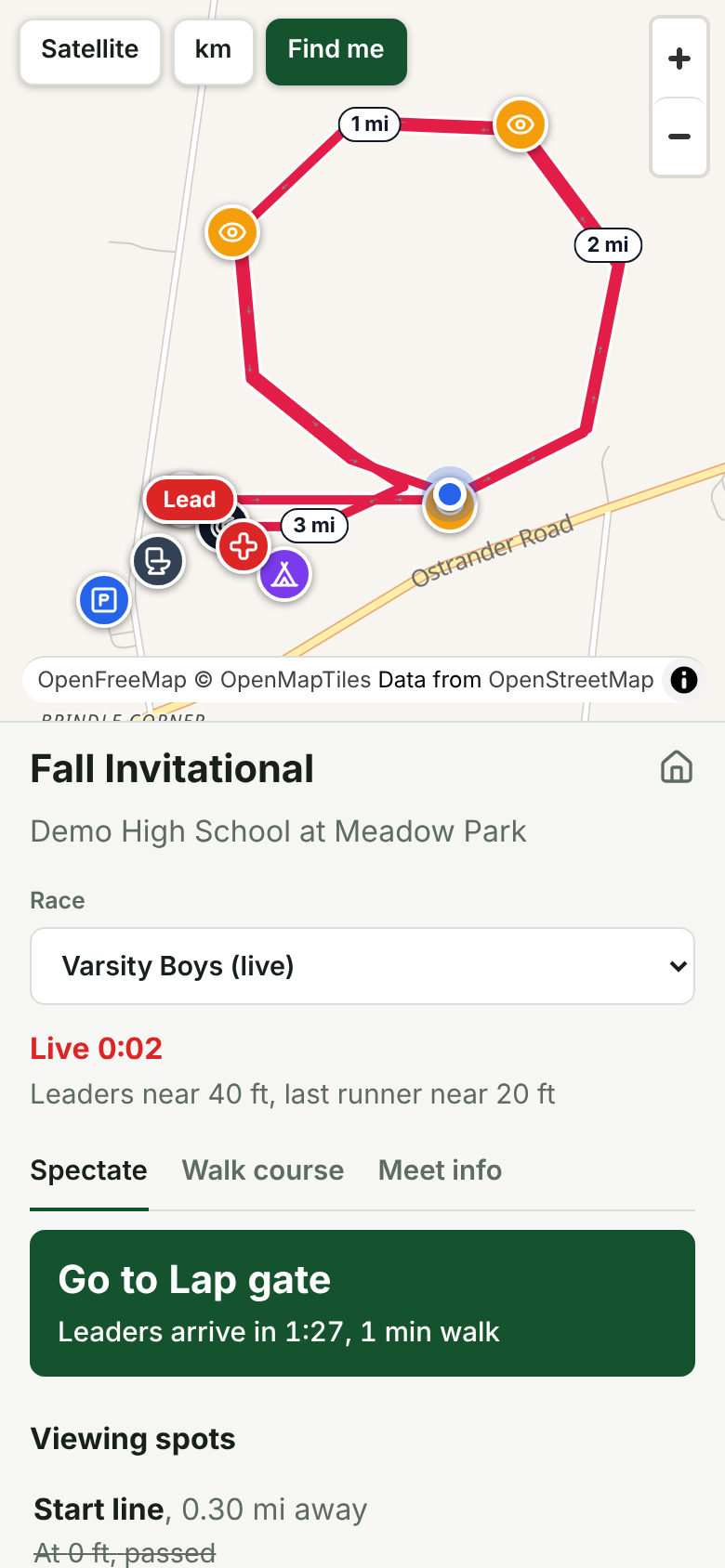
At most meets the course map is a picture on a website nobody can find, and a volunteer at the finish answers the same question two hundred times: where can I see them go by? Parents miss their kid at the two-mile mark because they didn't know the runners loop back past the start.
TrackXC answers that question on every phone at once.
How a meet day runs
-
Week before
Put the course on the map
Import the GPX from a walk of the course, or lay last year's paper map over the satellite view and trace it. Mark the start, finish, viewing spots, parking, restrooms and the trainer's tent. Set up each race with an expected winning time and last-finisher time.
-
Gates open
Spectators find it without asking
Post the QR code at the gate and on the heat sheet. Anyone who opens TrackXC at the park is taken straight to your meet, because it looks for meets near the phone. Each race has its own course and times.
-
The gun
Press Start, and the map comes alive
Start the race clock from your phone, or let your timing software do it with the exact gun time. Every spectator sees roughly where the leaders and the back of the field are, when they'll reach each viewing spot, and which spot they can still walk to in time.
Host schools
Fewer questions at the finish, fewer people cutting across the course, and a meet that looks organised to every visiting team. Put your school's colour and logo on the page.
Timing companies
Run the clock from FinishLynx, RaceResult or your own script through the API with the real gun time. Share each meet with the host school so they can edit the course while you run the races.
Leagues and clubs
Import meets from a RunSignup or MileSplit link. Keep every course from the season in one account, and give a championship meet its own web address.
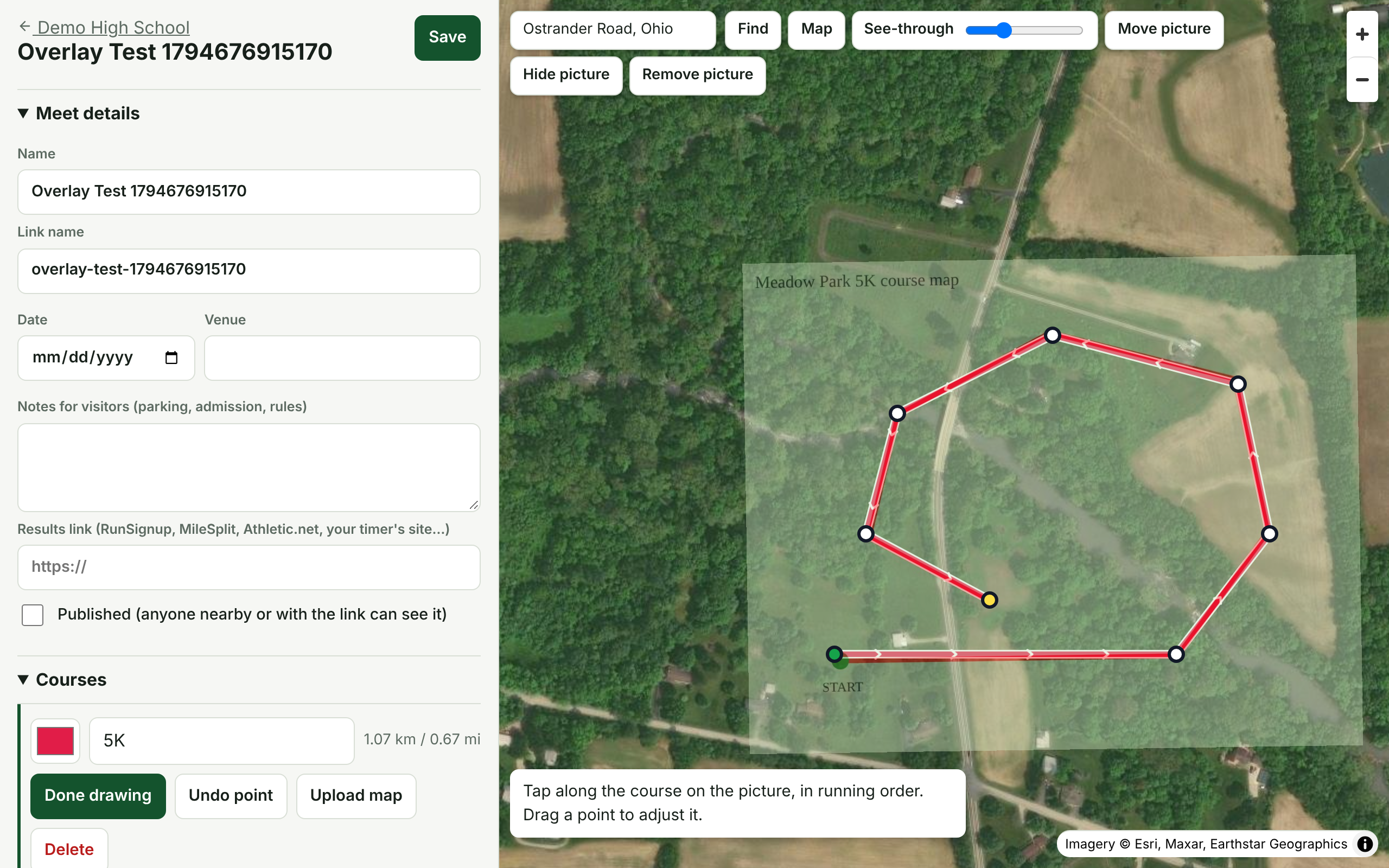
Only have a paper map? That's enough.
Upload a photo or PDF of the course map you already hand out. It sits over the satellite view, see-through; drag and turn it until the paths line up, then tap along the route. Ten minutes, and the picture never leaves your computer.
What it isn't: TrackXC doesn't put trackers on runners. Positions are an estimate from the race clock and the times you set, and the app says so. For most spectators, knowing the leaders are about ninety seconds from the pond is what they actually need.
Pricing
One price per school, club or company. Every plan includes unlimited spectators.
| Starter Free One meet on the map. Enough for a home invitational. | Pro $249 per year A full season of meets, your colours, and sharing with your timer. | Premium $749 per year For timing companies and leagues running meets every weekend. | |
|---|---|---|---|
| Published meets at a time | 1 | 10 | Unlimited |
| People who can sign in | 2 | 10 | Unlimited |
| Courses, viewing spots and race clock | Yes | Yes | Yes |
| Spectator app, QR code and meet link | Yes | Yes | Yes |
| Share a meet with your timer or host school | No | Yes | Yes |
| Your colour and logo on meet pages | No | Yes | Yes |
| A different look for each meet | No | No | Yes |
| A meet's own web address | No | No | Yes |
| Start free | Choose Pro | Talk to us |
Questions hosts ask
Do spectators need to download anything or make an account?
No. The meet opens in any phone browser from your link or QR code. There is an iPhone app too, which finds the meet you're at from your location, but nobody needs it.
Is it GPS tracking of the runners?
No, and we say so on screen. When the gun goes you press Start race, or your timing software does. The app then estimates where the leaders and the back of the field are from the expected winning and last-finisher times you set for each race. It's close enough to tell a parent whether to walk to the two-mile mark now or wait.
What if signal at the course is bad?
The course still draws on a plain background if the map tiles can't load, and the last meet a phone opened is kept on it. The live part needs a few bytes every few seconds, not a video stream.
How do we get our course in?
Upload a GPX, KML, KMZ, TCX or GeoJSON file from a watch, Strava or Google Earth, and it appears straight away. If all you have is a paper map or a PDF, lay it over the satellite view and trace the route with your finger.
We use a timing company. Can they run the clock?
Yes. Share the meet with them from the meet editor (Pro and up) and they can edit it and start races. Timing software can also start and stop the clock through the API with the real gun time.
How does billing work?
Starter is free. Pro and Premium are billed once a year by invoice; there is nothing to enter on the site. Tell us what you need in the form below and we'll set you up, usually the same day.
Get your meet on the map
Tell us about your meet and we'll set up your account and send you a sign-in link. If you send last year's course map, we'll trace the first course with you.
Still deciding? Read our meet director's checklist.